
我的联系方式
微信luoluo888673
QQ951285291
邮箱951285291@qq.com
2020-03-08学海无涯
接上文:[转载]WPF入门教程系列二(Application介绍)
三、WPF应用程序的关闭
WPF应用程序的关闭只有在应用程序的 Shutdown 方法被调用时,应用程序才停止运行。 ShutDown 是隐式或显式发生,可以通过指定 ShutdownMode 的属性值来进行设置。
1. 对ShutdownMode选项的更改,可以直接在App.xaml中更改,如下代码。
<Application x:Class="WpfApp1.App"
             xmlns="http://schemas.microsoft.com/winfx/2006/xaml/presentation"
             xmlns:x="http://schemas.microsoft.com/winfx/2006/xaml"
             StartupUri="MainWindow.xaml" ShutdownMode="OnExplicitShutdown" >
    <Application.Resources>
    </Application.Resources>
</Application>
2. 在代码文件(App.xaml.cs)中修改ShutdownMode选项,但必须注意这个设置要写在app.Run()方法之前 ,如下代码。
app.ShutdownMode = ShutdownMode.OnExplicitShutdown;
app.Run(win);
Application对象的其他属性:
四、添加Application对象事件
在应用程序中添加事件的方式有如下三种。
第一种方式
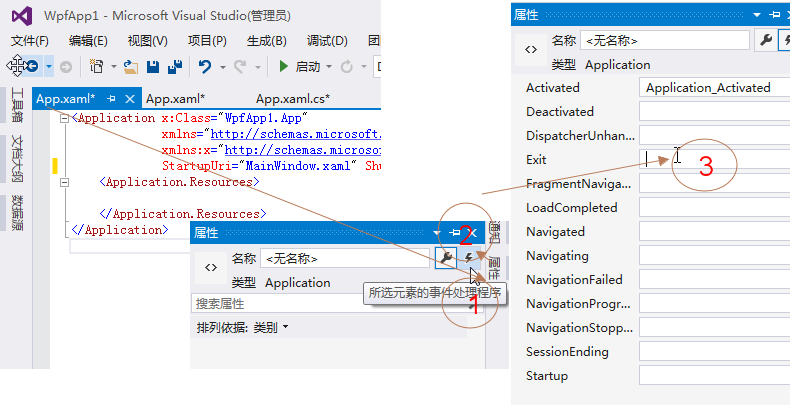
1、在App.xaml中做事件的绑定,在App.xaml.cs文件中添加事件的处理方法
在App.xaml文件中,具体添加方法见下图。
2、添加完事件之后的app.xml文件代码如下
<Application x:Class="WpfApp1.App"
             xmlns="http://schemas.microsoft.com/winfx/2006/xaml/presentation"
             xmlns:x="http://schemas.microsoft.com/winfx/2006/xaml"
             StartupUri="MainWindow.xaml" ShutdownMode="OnExplicitShutdown" Activated="Application_Activated" Exit="Application_Exit">
    <Application.Resources>
    </Application.Resources>
</Application>
3、在App.xaml.cs文件的代码如下:
using System;
using System.Collections.Generic;
using System.Configuration;
using System.Data;
using System.Linq;
using System.Threading.Tasks;
using System.Windows;

namespace WpfApp1
{
    /// <summary>
    /// App.xaml 的交互逻辑
    /// </summary>
    public partial class App : Application
    {
        private void Application_Activated(object sender, EventArgs e)
        {
        }
        private void Application_Exit(object sender, ExitEventArgs e)
        {
        }
    }
}
4.在使用以上方式添加事件之后,如果在Visual Studio中按F5 执行应用程序时,报以下错误“不包含适合于入口点的静态‘Main’方法”。这个错误是由于Visual Studio把项目文件(*.csproj)中原来自动生成的app.xaml相关的定义进行了修改。具体区别如下:<ApplicationDefinition Include="App.xaml">
<Generator>MSBuild:Compile</Generator>
<SubType>Designer</SubType>
</ApplicationDefinition>
2) Visual Studio把修改后的App.xaml的配置代码如下:
<Page Include="App.xaml">
      <SubType>Designer</SubType>
      <Generator>MSBuild:Compile</Generator>
</Page>
第一段代码中App.xaml在项目文件里面用ApplicationDefinition标签定义。第二段代码中App.xaml在项目文件里面用Page标签定义,这种定义是指App.xaml只是一个页面而已。using System;
using System.Collections.Generic;
using System.Linq;
using System.Text;
using System.Threading.Tasks;
using System.Windows;
namespace WpfApp1
{
class App
{
[STAThread]
static void Main()
{
// 定义Application对象作为整个应用程序入口
Application app = new Application();
MainWindow win = new MainWindow();
app.ShutdownMode = ShutdownMode.OnMainWindowClose;
app.MainWindow = win;
//是必须的,否则无法显示窗体
win.Show();
app.Run();
app.Activated += app_Activated;
app.Exit += app_Exit;
}
static void app_Activated(object sender, EventArgs e)
{
throw new NotImplementedException();
}
static void app_Exit(object sender, ExitEventArgs e)
{
throw new NotImplementedException();
}
}
}
第三种方式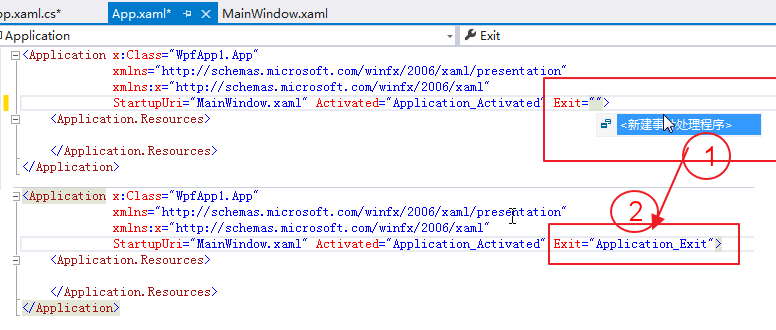
五、WPF应用程序生存周期
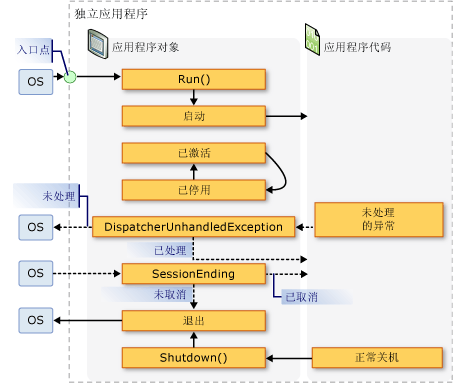
WPF应用程序的生命周期与执行顺序,用MSDN上的一张图片进行说明。下图显示了窗口的生存期中的主体事件的顺序。

微信luoluo888673
QQ951285291
邮箱951285291@qq.com